 Tiny Desk AI
The short answer. To make the Outstanding Tiny Desk AI video, you put your own people into the band from the Tiny Desk performance of "Outstanding", and there are three ways to do it. The least work is a site built for this one clip: on Tiny Desk AI you upload your photos and get back a 15-second 9:16 video in 720p, paid once from $9.90 for 1 video. The CapCut template is the route most TikTok tutorials show, but it runs in the CapCut app and opens from a TikTok link. Kling is the most hands-on: you paste the original video's link into the Kling app and swap people in yourself. Use a site like ours if you want no app and no editing; use CapCut or Kling if you already have the app on your phone.
Updated October 28, 2026.
What the trend is
The song is "Outstanding" by The Gap Band, a 1982 single from the album Gap Band IV that reached number one on Billboard's Hot Black Singles chart in 1983. Its singer, Charlie Wilson, played it as the closing song of his NPR Tiny Desk Concert, published on June 5, 2023: a band packed behind the little desk, backing singers in headphones, a close-up of the singer grinning mid-song and a saxophone solo.
The AI version started on TikTok on October 18, 2026. One account posted the Tiny Desk band rebuilt with the college football head coaches who had lost that week, captioned "College Football's Week 8 All-Loss Tiny Desk Concert". It passed 2 million views, and TikTok labels it as containing AI-generated media. The clip is vertical, about 19 seconds long, and keeps the performance's sound.
The joke is a band of the week's losers having the time of their lives. Fans of other teams and fantasy football leagues copied it with their own "losers of the week", Kling and CapCut tutorials appeared from October 24, and Google searches for the trend rose from the same day.
In the remakes we watched, the whole person is replaced, not only the face: hair, build and clothes change too, while the room, the camera order and the music stay as in the original. Every popular remake we watched swapped a group, each spot played by someone different.
Way 1: your photos in a browser
A site made for this clip keeps the reference video and the editing on its side. On Tiny Desk AI:
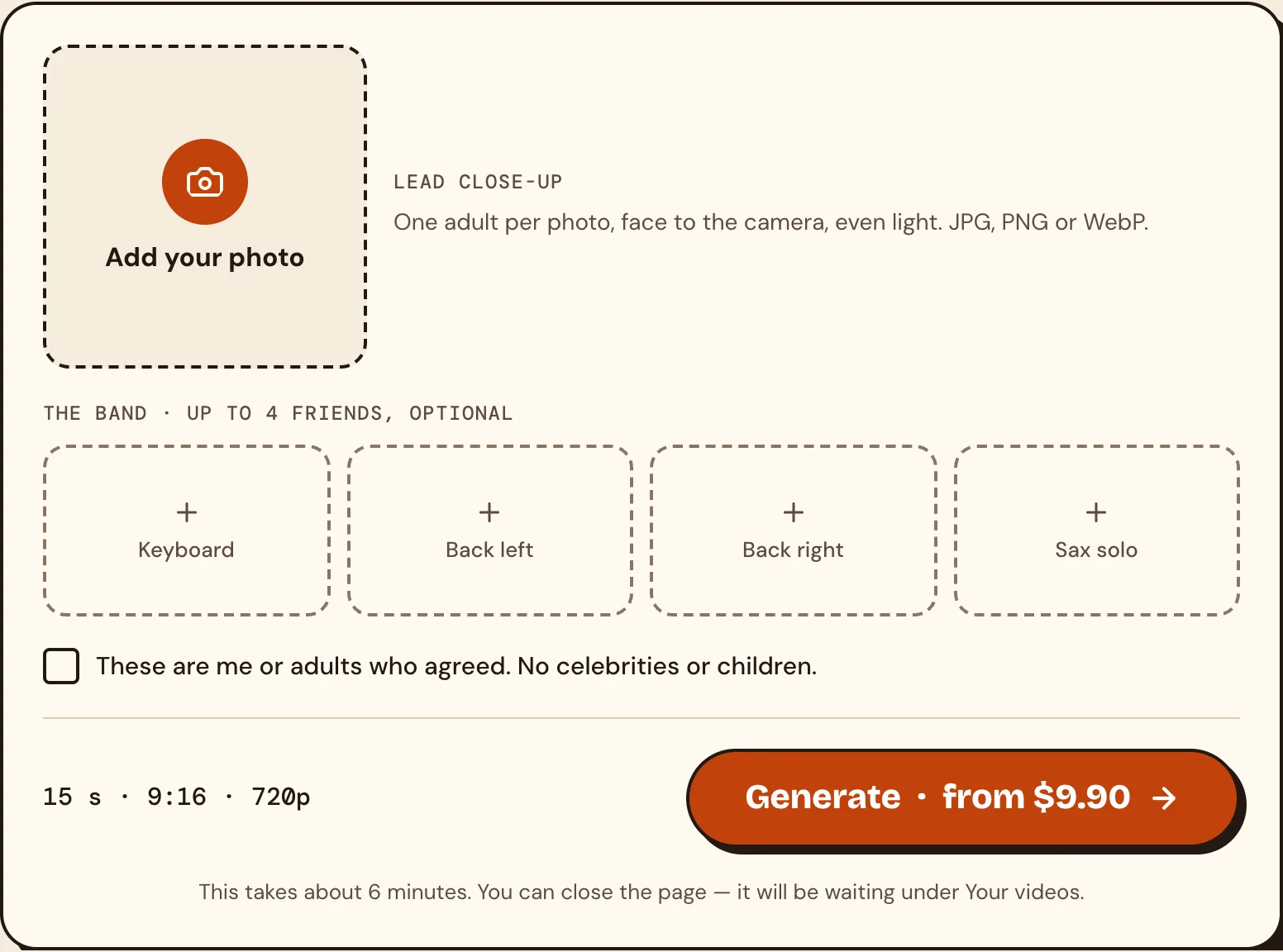
- Upload 1 to 5 photos, one per seat: the lead close-up, the keyboard, back left, back right and the sax solo. A seat you leave empty keeps the band of our template. The photos have to be of you, or of adults who agreed to be in it.
- Press Generate. Videos come in packs paid once: 1 video for $9.90, 3 for $19.90, and 5 for $29.90.
- Download a 15-second 9:16 video in 720p, the shape TikTok expects. It has no sound: add the Outstanding sound in TikTok when you post.
There is no app to install, no TikTok link to find and no prompt to write. If a video fails, its credits go back. It is not free: every render costs real money, so there is no free trial.
Way 2: the CapCut template
Most of the TikTok posts under #outstandingtinydesk are how-to tutorials, and one of the two tools they show is a CapCut template. The CapCut tutorial we watched ends on its "Use template in CapCut" button; the template behind it had been used 503 times when we looked on October 28, 2026.
- Install the CapCut app on your phone.
- Open a TikTok made with the template and tap its "Use template in CapCut" button, which opens the template in the app.
- Add your photos where the template asks for them.
- Export the video and post it.
The limits: you need the app, you need to find a TikTok that links the template, and you get what the template was built to do. In the CapCut tutorial result we watched, the three people in the wide band shot were swapped.
Way 3: Kling with the original clip
Kling's video editing can take an existing video as the reference and swap the people in it. The Kling tutorial we watched follows this flow:
- Install the Kling app.
- Copy the link of the Tiny Desk video you want to copy.
- Paste the link into the Kling app so it uses that video as the reference.
- Add your photos for the people you want to swap in, then render.
This gives you the most control over who goes where, and it is also the most work: you handle the app, the link and the retries yourself. Check Kling's own site for what a generation costs. We compare all of these, with the prices each site lists, in the best Tiny Desk AI video generators.
How to pick your photos
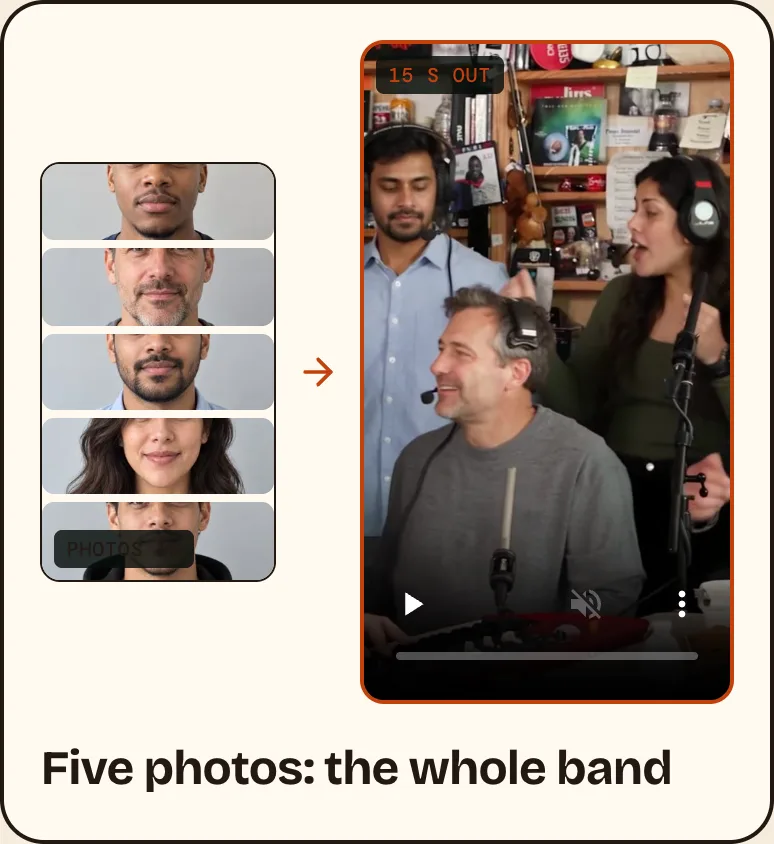
The Tiny Desk AI sites we read ask for much the same kind of photo:
- One adult per photo, face to the camera. They ask for a clear face looking at the camera, not a profile.
- Waist up, in good light. A face that is tiny in the frame or blurry gives the AI too little to work with.
- Nothing covering the face. No sunglasses, masks or heavy filters.
- The right people. The trend is funnier with a real group: your fantasy league's worst team this week, your rec team, your friends. Only use people who said yes.
Posting it on TikTok
The finished video is vertical, the shape TikTok, Reels and Shorts use. When you post, turn on TikTok's AI-generated content label; the original post in this trend carries that label too. Calling it an AI parody in the caption also helps people see it is not a real Tiny Desk performance.
Use it responsibly
- Use your own photo, or photos of adults who agreed.
- No celebrities, no public figures and no children. The original post used real coaches; that is the trend's history, not something to copy with real people's faces.
- Tiny Desk AI is an independent parody tool. It is not affiliated with NPR, Tiny Desk, Charlie Wilson or The Gap Band.
Questions people ask
Is there a free way to make it?
None of the four Tiny Desk AI sites we read offers a free trial, ours included. CapCut and Kling are apps with their own pricing; check them before you start.
Do I need the CapCut template?
No. The template is one route. A browser tool like Tiny Desk AI needs no app and no template.
What song is in the Tiny Desk AI video?
"Outstanding" by The Gap Band (1982), as Charlie Wilson performed it at his NPR Tiny Desk Concert in June 2023.
How long is the video?
The original TikTok runs about 19 seconds. Ours is 15 seconds, 9:16, in 720p.
Is this an official Tiny Desk video?
No. It is an AI parody. No site that makes these videos, ours included, is connected to NPR or the artists.
Ready to put your crew behind the desk? Make your Tiny Desk AI video.